Attitude Instrument Flying
A short operational guide to keeping the airplane stable by reference to instruments when outside visual cues stop helping.
Quick Reference
Key points
Short-answer refresher for returning pilots before diving into the full page.
Quick Reference
Key points
Short-answer refresher for returning pilots before diving into the full page.
- Set a known attitude and power picture first, then let the scan confirm whether the airplane is doing what you expected.
- Pitch drives altitude and airspeed trend together, bank drives heading change, and trim protects the scan from wasted attention.
- Stable instrument flying feels methodical because each correction is small, deliberate, and followed by a full rescan.
Standards & References
FAA doctrinal and ACS cross-reference
Use this box to line the topic up with the FAA’s primary instrument handbooks, the most relevant ACS task areas, and the knowledge, skill, and risk elements that usually drive checkride evaluation.
- IFH Ch. 5, Attitude Instrument Flying: the control-and-trim loop, supporting instrument interpretation, and maintaining stable attitude in IMC.
- IFH Ch. 6, Basic Flight Maneuvers: the overview transition from methods into practical maneuvers, takeoff control, and unusual-attitude recovery.
- Supporting only: this is prerequisite control skill applied during the published procedures in IPH Chs. 1 through 4 rather than a stand-alone procedural chapter.
- IV.B Basic Instrument Maneuvers.
Checkride Focus
How this topic is typically evaluated
Use this block as the ACS-ready summary: what task areas this page supports, what the applicant should know, what the applicant should be able to do, and what risks must be managed without prompting.
Checkride Summary
Expect the evaluator to care about stable control by reference to instruments, not verbal scan knowledge alone. The airplane should stay organized while the pilot uses a repeatable set-trim-scan-correct loop.
Knowledge
- Know the control loop, scan methods, and the difference between primary-and-supporting and control-performance logic.
- Understand how pitch, power, and trim work together in the basic maneuver picture.
- Recognize fixation, omission, emphasis, and other scan failures before they become large deviations.
Skills
- Hold altitude, heading, and airspeed by reference to instruments with small, deliberate corrections.
- Transition between basic maneuvers without losing the overall scan rhythm.
- Recover from developing deviations early instead of chasing the panel after the fact.
Risk Management
- Fixation, omission, or overcontrol that turns one small drift into multiple deviations.
- Trim neglect that makes the pilot work harder than the maneuver requires.
- Somatogravic and spatial-disorientation cues after takeoff or in turbulence.
On This Page
Overview
Attitude instrument flying is the core IFR skill: hold pitch, bank, and power where you want them, then confirm performance before the deviation grows. Everything else in instrument flying sits on top of that. If the control picture is unstable, the procedure will unravel with it.
The shortest usable mental model is set, trim, scan, correct. Set the airplane to an expected attitude and power combination, trim away steady pressure, scan the panel for trend, then make the smallest correction that solves the problem.
This page is the overview and entry point for the Attitude Instrument Flying section. Use it to understand the big picture, then drop into the six core subpages: Scan, Control-Performance, Primary/Supporting, Basic Maneuvers, Unusual Attitudes, and Instrument Takeoff.
Chapter Map
This is the explicit Attitude Instrument Flying section map for the site. The six core subpages below are the highest-priority block, and the supporting pages underneath them reinforce the same skills with maneuver-specific practice.
Scan
Build the eye pattern and cross-check habit that keeps the panel organized.
Control-Performance
Set a known attitude and power picture, then verify the performance result.
Primary/Supporting
Know which instrument leads each maneuver and which instruments confirm trend.
Basic Maneuvers
Use the maneuver hub to branch into climb, descent, and turn practice pages.
Unusual Attitudes
Separate nose-high and nose-low recovery logic with clear cockpit calls.
Instrument Takeoff
Brief and stabilize the departure when the natural horizon disappears right after liftoff.
Supporting practice pages
Use Climbs, Descents, Turns, and Common Errors after the six core subpages to reinforce the same section with maneuver-specific repetitions and reset habits.
Control Loop
The control loop is simple on purpose. It gives the pilot a repeatable rhythm under stress instead of improvising every correction.
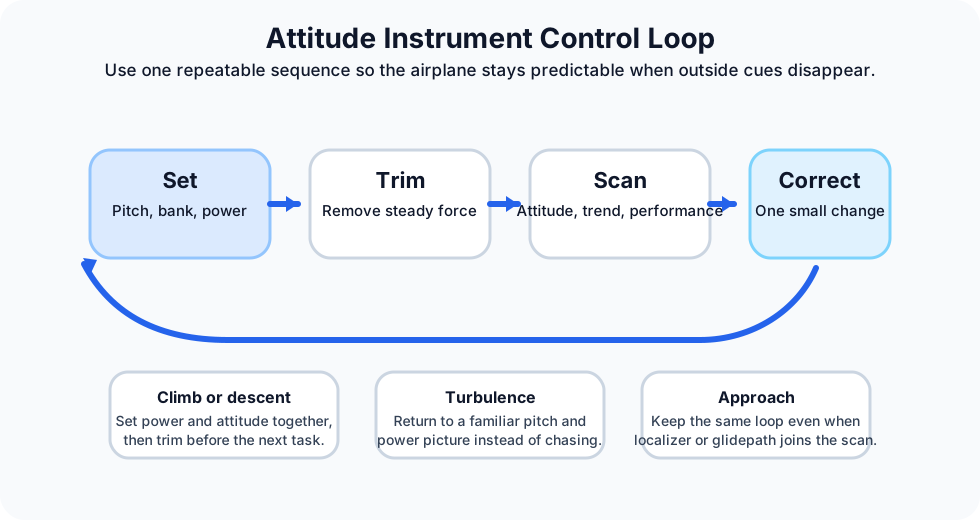
- Set: establish the attitude and power that should produce the maneuver.
- Confirm: cross-check altitude, airspeed, heading, and trend instruments.
- Correct: use a small pitch, bank, or power change, then go back to a normal scan.
Attitude, Power, Trim
Most instrument control problems start because one of these three was left unfinished. The pilot changed attitude but not power, added power but never trimmed, or trimmed before the airplane was actually stabilized.
Pitch
Set attitude first. Pitch drives altitude trend and airspeed trend together.
Power
Use a known power setting for the maneuver instead of inventing one after the deviation appears.
Trim
Trim after the airplane is close to target so the scan is not wasted fighting control pressure.
In practice, that means an instrument correction is rarely just one movement. A climb needs pitch, power, and trim. A descent usually needs the same. Treating trim as optional is a fast way to make the scan collapse.
Cockpit Flow
A short cockpit script keeps the pilot from overcontrolling. Use the same words every time until the sequence becomes automatic.
What to say and do
- Set: "Pitch, power." Put the airplane where you expect it to be.
- Trim: "Trim it off." Remove steady control force before the next task arrives.
- Scan: "Attitude, performance, trend." Look for movement, not just present numbers.
- Correct: "Small change." Fix the first drift with the smallest useful input.
If the panel starts looking busy, simplify instead of reacting faster. Level the wings, return to a familiar attitude and power picture, trim, and rebuild the task from there.
Scenario Walkthroughs
Scenario 1
Initial climb into cloud after takeoff
You lose the natural horizon shortly after liftoff and the airplane starts to feel more nose-high than it is.
- Say: "Pitch, power." Set the known climb picture instead of trusting body sensation.
- Trim immediately so the climb does not turn into a strength contest.
- Scan attitude, airspeed, and heading first, then verify altitude trend once the climb stabilizes.
- If a correction is needed, make one small pitch change, then return to the full scan.
Scenario 2
Light turbulence on an instrument approach
The panel becomes busier, localizer corrections tempt you into larger inputs, and trim starts to lag behind the airplane.
- Say: "Small change." Keep the corrections smaller than your first instinct.
- Return to the known pitch and power picture between each guidance correction.
- Retrim as soon as the control force becomes steady again.
- If the airplane stops feeling stable, reset the loop: set, trim, scan, correct.
Study Map
Use this page as the quick cockpit version, then work through the specific building blocks in a deliberate order.
- Start with the control-performance method
- Then lock in primary and supporting instruments
- Build the scan patterns and cross-check habit
- Use the basic-maneuvers overview as your practice hub
- Practice instrument climbs
- Practice instrument descents
- Practice instrument turns
- Practice unusual-attitude recovery
- Add the instrument-takeoff launch sequence
- Finish with the common-errors reset page
- Use the long-form attitude instrument flying reference when you want deeper narrative detail
References
- FAA Instrument Flying Handbook: the primary FAA source for attitude instrument flying, scan, and control methods.
- FAA Airplane Flying Handbook: pitch, power, trim, and maneuver control fundamentals that support IFR technique.